The First Impression That Decides Everything
When someone lands on your website, you have less than five seconds to make a good impression. In that blink of an eye, your visitor is subconsciously asking: Can I trust this brand?
And often, that answer comes not from your words — but from your design.
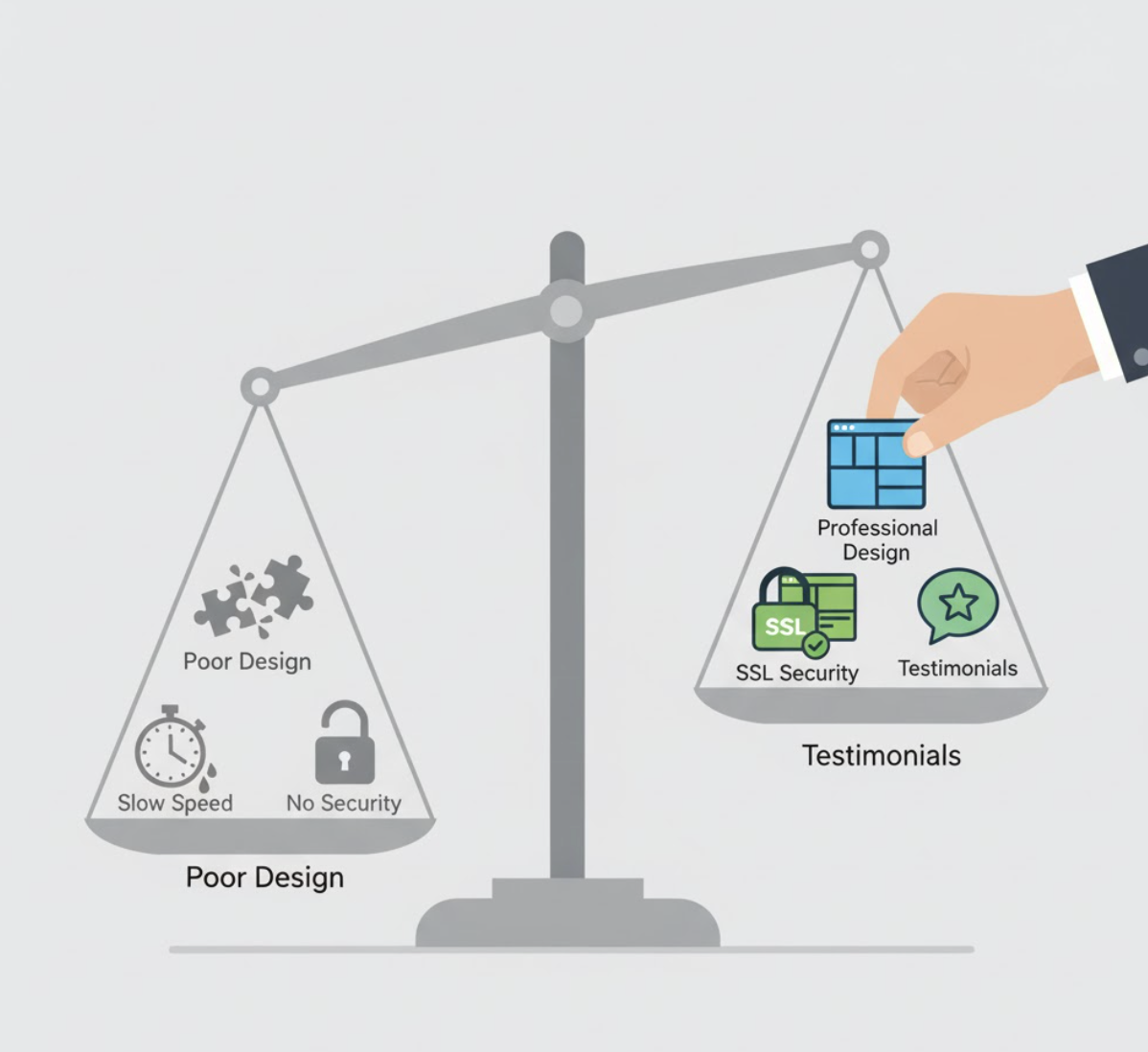
Poor design, cluttered layouts, or outdated visuals immediately raise red flags. On the other hand, a clean, professional, and intentional website can instantly communicate credibility, competence, and care — three things every buyer subconsciously looks for before doing business.

What Makes a Website Credible?
Let’s break down the design and content elements that most influence website credibility:
1. Professional, Consistent Design
A modern, polished website design signals that your business is active and professional. Keep these design principles in mind:
- Use consistent typography and color palettes.
- Maintain clear visual hierarchy (headings, subheadings, spacing).
- Avoid clutter — whitespace builds focus and calm.
- Ensure mobile responsiveness across all devices.
A well-designed layout reflects the same level of care you bring to your products or services.
2. Fast Loading Speed
According to Google, over 50% of users abandon a site if it takes more than three seconds to load.
A slow website feels untrustworthy — like a shop with a broken door. Optimize images, compress files, and choose a reliable host to ensure fast load times.
💡 See our guide on improving loading speed to protect your conversions.
3. Security and Transparency Signals
Small visual cues go a long way in communicating safety. Include:
- HTTPS and SSL certificates
- Security badges and trust seals (especially on checkout pages)
- Clear privacy policies and contact information
When visitors see transparency and technical safety, their confidence in your brand grows.
4. Social Proof and Testimonials
Nothing builds credibility faster than real people vouching for you.
Add a section featuring:
- Customer testimonials (with names and photos)
- Case studies or success stories
- Client logos or media mentions
This type of social proof validates your claims and lowers buyer hesitation.
5. Consistent Brand Messaging and Tone
Your design sets the stage, but your words build the relationship.
Use consistent tone and messaging across your pages. Whether someone reads your homepage, about page, or blog — it should feel like the same trusted expert is speaking throughout.
Why Credibility = Conversions
A credible website isn’t just about looking good. It directly impacts your bottom line.
When visitors trust your website, they:
- Spend more time exploring your content.
- Feel safer sharing personal information.
- Are more likely to fill out forms or complete purchases.
In short, trust reduces friction — and friction kills conversions.
That’s why credibility should be a core focus of your conversion optimization strategy, not an afterthought.
How to Audit Your Website for Credibility
If you’re unsure whether your site builds or breaks trust, try this 5-step credibility audit:
| Step | What to Check | Why It Matters |
|---|---|---|
| 1 | Visual design consistency | First impressions build confidence |
| 2 | Page load speed | Reduces bounce rate, improves experience |
| 3 | Security (HTTPS, SSL) | Shows you protect customer data |
| 4 | Social proof | Validates your claims through others |
| 5 | Clear CTAs and navigation | Builds trust through ease and clarity |
🧭 Need a deeper audit? Our Fix My Website Conversions report pinpoints the trust and usability gaps holding your site back.
Common Mistakes That Undermine Credibility
Avoid these subtle but costly errors that make visitors question your reliability:
- Using stock photos that feel inauthentic or overused.
- Having outdated content or broken links.
- Using inconsistent branding (logos, fonts, or tone).
- Displaying too many pop-ups or aggressive CTAs.
- Ignoring mobile optimization.
Even minor inconsistencies can chip away at the professional image you’ve built elsewhere.
FAQs About Website Credibility
1. What is website credibility?
Website credibility is the level of trust users feel toward your site based on its design, content, and overall experience.
2. How can I make my website look more trustworthy?
Use clean design, clear navigation, HTTPS security, real testimonials, and professional branding.
3. Does design really affect trust that much?
Yes — research from Stanford found that 75% of users judge credibility based on design quality.
4. What role does content play in credibility?
Your content should be accurate, current, and written in a confident yet empathetic tone — consistent with your brand voice.
5. How can I test my site’s trustworthiness?
Use tools like Hotjar or Google Analytics to measure bounce rates and engagement, or get a professional audit through ActStrategic.ai.
Final Thoughts: Trust Is Your Best Conversion Strategy
Credibility doesn’t come from one design choice — it’s the sum of every detail that reassures your visitor you’re the real deal.
If your site looks good but still struggles to convert, it might not be your offer — it’s your user’s confidence.
🔍 Get clarity on what’s breaking trust and costing you leads. Explore our Fix My Website Conversions report to identify the leaks in your sales system.